
Other Features#
This page describes other useful features available in RasCAL-2
Undo and Redo#
RasCAL-2 is designed so that changes made to the project, controls and results can be undone. You can undo
and redo an action by clicking the  or redo
  buttons from the toolbar respectively. The history of
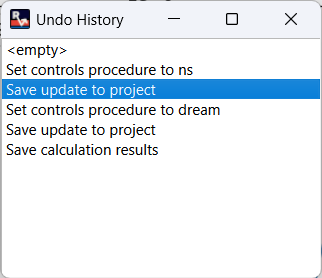
reversible actions can be viewed by clicking Edit > Undo History. This will open the undo history dialog which
shows a list of actions performed and the current action will be highlighted. Clicking on any entry in the list will
make that entry the current action by undoing or redoing until that action is reached.
buttons from the toolbar respectively. The history of
reversible actions can be viewed by clicking Edit > Undo History. This will open the undo history dialog which
shows a list of actions performed and the current action will be highlighted. Clicking on any entry in the list will
make that entry the current action by undoing or redoing until that action is reached.
The following operations cannot be undone:
Visualization actions (e.g. changing the plot zoom, or arrangement of windows),
Changes to the settings,
Exporting plot, project or fits.